

Are you thinking about switching your domain from HostGator to Hostinger? You’re in the right place!
Transferring a domain might sound complicated, but with the right guidance, it’s straightforward. Hostinger, renowned for its robust web hosting solutions and user-friendly platform, makes this process seamless. Not only does it offer up to 75% off hosting, but it also provides a free domain and website migration, ensuring you face no downtime.
Plus, with features like an AI website builder and 24/7 customer support, Hostinger is well-equipped to handle your needs. Imagine having a high-performance website with global reach and top-notch security, all while being cost-effective. In this guide, you’ll find a step-by-step process to transfer your domain effortlessly. Don’t let technical jargon hold you back; let’s get your domain settled into its new home. Keep reading to discover how easy it is to make the switch and why Hostinger is the perfect choice for your website’s future.
Introduction To Domain Transfer
Transferring your domain from one host to another may seem daunting. But with the right guidance, it becomes a straightforward process. Many opt to transfer domains for better services or cost efficiency. If you’re considering moving your domain from HostGator to Hostinger, this guide will simplify the steps for you. Hostinger provides attractive features like a free domain, an AI website builder, and 24/7 customer support, making it a popular choice.
What Is A Domain Transfer?
A domain transfer involves changing the registrar managing your domain. This does not affect the website’s content or functionality. It’s mainly about the domain’s control and renewal management. The process ensures your domain is managed by a registrar offering better services or pricing. Reasons for a domain transfer can include better support, more features, or cost savings.
Why Transfer From HostGator To Hostinger?
Many users find Hostinger’s offerings appealing compared to HostGator. Here’s why:
- Cost-Effective Plans: Hostinger offers plans at significant discounts, with prices starting as low as $2.99/month.
- Free Domain: Every plan includes a free domain valued at $9.99, reducing initial costs.
- Free Website Migration: Hostinger provides hassle-free migration with no downtime.
- 24/7 Customer Support: Support is available in over 8 languages through live chat and email.
- Security Features: Unlimited free SSL certificates and regular backups ensure your site is secure.
Hostinger is known for its high-speed, reliable, and secure hosting solutions. It’s trusted by over 3 million website owners worldwide and recommended by WordPress.org. With these benefits, transferring your domain to Hostinger can enhance your website’s performance and reach.
Credit: www.hostinger.com
Preparing Your Domain For Transfer
Transferring your domain from HostGator to Hostinger involves a few crucial steps. Ensuring your domain is ready for transfer is essential for a smooth transition. This section will guide you through unlocking your domain and obtaining the EPP code.
Unlocking Your Domain
Before transferring, your domain must be unlocked. This step is vital as it allows the transfer to proceed. Log in to your HostGator account and navigate to the Domain Management section. Look for the Locking option. If your domain is locked, click to unlock it. An unlocked domain is a prerequisite for initiating the transfer process.
Obtaining The EPP Code
The EPP code is a unique key required for domain transfers. To obtain it, remain logged in to your HostGator account. Navigate to the Transfer section. Here, you will find an option to request your EPP code. HostGator will send this code to your registered email address. Ensure you have access to this email, as it contains the necessary code for the transfer.
Steps To Initiate Transfer On Hostinger
Transferring your domain from HostGator to Hostinger involves a few critical steps. Hostinger offers a user-friendly domain transfer process, ensuring a seamless transition. Below, you’ll find detailed instructions on how to initiate your domain transfer on Hostinger.
Accessing Hostinger’s Domain Transfer Tool
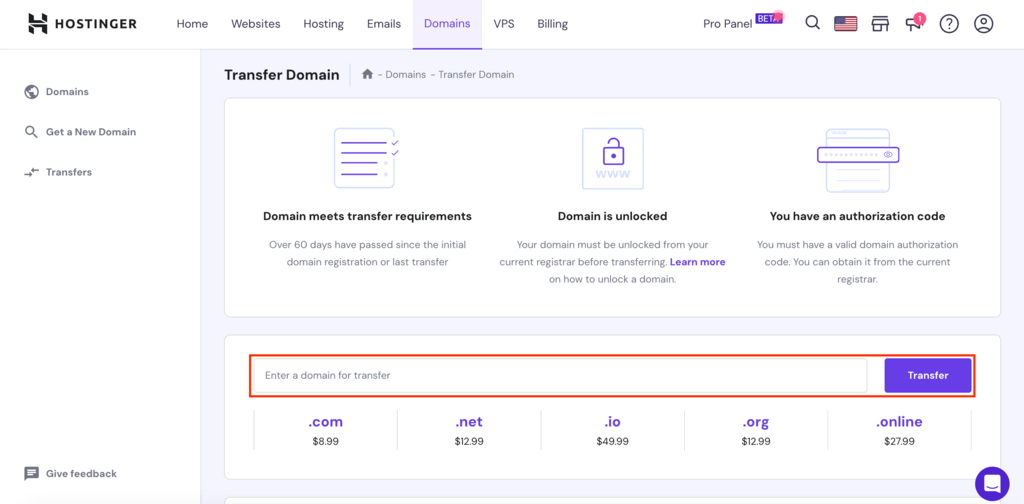
Begin by logging into your Hostinger account. Navigate to the dashboard. You will find the Domain Transfer tool under the domain management section. Click on this tool to start the transfer process.
The tool is designed to be intuitive, guiding you through each step. Ensure you have all the necessary information ready, including your domain details and EPP code from HostGator.
Entering The Epp Code
Once you’ve accessed the Domain Transfer tool, you will need to enter the EPP Code. This code is essential for verifying your domain ownership. You can obtain the EPP code from HostGator by accessing your domain settings.
Enter the EPP code accurately. Double-check for any errors to avoid transfer delays. Confirm the code submission to proceed with the transfer.
Monitoring The Transfer Process
Transferring your domain from HostGator to Hostinger involves several steps. Monitoring the transfer ensures everything proceeds smoothly. Keeping track of the process helps prevent delays. It also allows you to quickly address any issues that might arise. Here’s how you can effectively monitor your domain transfer.
Expected Timeframe For Transfer
The domain transfer from HostGator to Hostinger can take up to 7 days. The timeframe depends on the current domain provider’s release policies. Typically, Hostinger processes incoming transfers efficiently. During this period, you can expect the domain to remain active. There will be no downtime for your website. Ensure all transfer prerequisites are met to avoid delays.
Checking Transfer Status On Hostinger
Hostinger offers an easy way to check the status of your domain transfer. Log in to your Hostinger account. Navigate to the ‘Domains’ section in the dashboard. You will see a list of your domains and their statuses. Look for the domain you are transferring. The status will indicate the current stage of the transfer.
- Pending Approval: Waiting for approval from the current registrar.
- In Progress: The transfer is being processed by Hostinger.
- Completed: Transfer is successful, and the domain is now managed by Hostinger.
If there are issues, Hostinger’s 24/7 customer support is available to assist. Use live chat or email for quick responses. Hostinger supports multiple languages, making it accessible for non-native speakers. This ensures you can resolve issues efficiently and continue building your website without interruptions.
Monitoring your domain transfer process ensures peace of mind. It allows you to focus on enhancing your website with Hostinger’s robust features.
Pricing And Affordability Of Domain Transfers
Transferring your domain from HostGator to Hostinger can be a smart move. Yet, understanding the pricing and affordability is crucial. This section explores the cost implications and renewal rates, helping you make an informed decision.
Cost Implications Of Transferring A Domain
Transferring a domain involves certain costs that vary by provider. Hostinger offers a free domain valued at $9.99, making it an attractive choice. HostGator’s transfer costs typically depend on the domain type and renewal fees. It’s essential to weigh these costs against the benefits, such as free website migration and 24/7 customer support offered by Hostinger.
- Free domain from Hostinger
- Website migration without downtime
- Continuous support in multiple languages
Comparing Renewal Rates Between HostGator and Hostinger
Renewal rates play a significant role in long-term affordability. Hostinger’s renewal rates start at $10.99/month for the Premium Plan, while HostGator’s rates may vary based on the domain and hosting plan chosen. Hostinger offers substantial savings with up to 75% off
| Plan | Hostinger Renewal Rate | Hostgator Renewal Rate |
|---|---|---|
| Premium Plan | $10.99/month | Varies |
| Business Plan | $13.99/month | Varies |
| Cloud Startup Plan | $25.99/month | Varies |
Choosing Hostinger could be more cost-effective due to the added free months and reduced initial rates. It’s wise to compare these rates and features to ensure the best value for your domain transfer.
“`

Credit: www.youtube.com
Pros And Cons Of Transferring Domains
Transferring a domain from HostGator to Hostinger can be a strategic move for website owners. Understanding the pros and cons of domain transfer helps in making informed decisions. Hostinger provides a feature-rich hosting environment that can enhance website performance. However, challenges may arise during the transfer process.
Benefits Of Transferring To Hostinger
- Free Domain: Hostinger offers a free domain as part of its hosting plan, saving you $9.99.
- Free Website Migration: Seamless migration to Hostinger without any downtime.
- 24/7 Customer Support: Dedicated support available in multiple languages.
- AI Website Builder: Simplifies website creation with an intuitive interface.
- Unlimited Free SSL: Secures your site with SSL certificates at no extra cost.
- High Performance: Faster page loading speeds and lower response times.
- Cost-Effective Plans: Significant savings with long-term hosting plans and free months.
Potential Challenges And How To Overcome Them
While transferring domains offers numerous benefits, some challenges may occur. Below is a table highlighting potential challenges and solutions.
| Challenge | Solution |
|---|---|
| Domain Lock | Ensure the domain is unlocked before initiating transfer. |
| Transfer Code | Obtain the EPP code from HostGator for authorization. |
| Email Verification | Verify the transfer request via email promptly. |
| Data Loss Concerns | Perform backups before starting the transfer. |
| Downtime Fears | Hostinger’s free migration ensures no downtime. |
Recommendations For Ideal Scenarios
Transferring your domain from HostGator to Hostinger can be a strategic move. With Hostinger, you get a suite of services designed to enhance your online presence. These services include a free domain and free website migration. Understanding the right time and who benefits most is crucial for a smooth transition.
When Should You Consider Transferring?
Consider transferring your domain to Hostinger in several scenarios:
- Need for Better Performance: Experience faster loading speeds and reliable uptime.
- Cost-Effective Solutions: Save more with Hostinger’s competitive pricing and long-term discounts.
- Enhanced Security: Benefit from regular backups and DDoS protection.
- Global Reach: Hostinger connects automatically to the nearest data center for optimal performance.
Who Benefits Most From Transferring?
Transferring your domain to Hostinger is ideal for:
- Small Business Owners: Affordable plans help manage costs while scaling up.
- Beginner Webmasters: User-friendly dashboard simplifies website management.
- WordPress Users: Hostinger offers optimized hosting for WordPress sites.
- Security-Conscious Users: Enjoy unlimited free SSL and two-factor authentication.
With Hostinger, both beginners and experienced users find valuable benefits. The platform offers tools and support to enhance your website’s performance and security.
| Feature | Benefit |
|---|---|
| AI Website Builder | Simplifies website creation |
| 24/7 Customer Support | Assistance in 8+ languages |
| NVMe Storage | Fast data access with up to 100 GB |
| Free CDN | Improves site speed and security |
Hostinger’s focus on performance, security, and affordability makes it a compelling choice. Consider these recommendations to ensure a seamless domain transfer experience.
Credit: www.youtube.com
Frequently Asked Questions
How Do I Transfer My Domain To Hostinger?
Start by unlocking your domain at the current registrar. Obtain the transfer authorization code. Log into Hostinger and choose “Transfer Domain. ” Enter the code and follow the prompts to complete the transfer. Ensure your domain meets Hostinger’s transfer requirements for a smooth process.
Can I Move My Domain From One Hosting Service To Another?
Yes, you can move your domain to another hosting service. Update your domain’s DNS settings. Ensure the new host is prepared to handle your domain. Back up your website data before transfer. Follow the new host’s instructions for a smooth transition.
How Long Does It Take To Transfer A Domain To Hostinger?
Domain transfer to Hostinger usually takes 5 to 7 days. Ensure the domain is unlocked and accurate authorization code. Keep contact details updated for a smooth process. Check email for verification requests. Tracking transfer status via Hostinger dashboard helps stay informed. Contact support if issues arise during the transfer.
How To Migrate A Site To Hostinger?
To migrate a site to Hostinger, back up your website files and database. Upload them to Hostinger using FTP. Adjust DNS settings to point to Hostinger servers. Verify the website functions properly on Hostinger. Consult Hostinger’s support for assistance if needed.
Conclusion
Transferring your domain to Hostinger is straightforward and beneficial. You gain access to top features like free domain and website migration. Hostinger’s 24/7 support ensures smooth transitions. Its user-friendly tools make managing your site easy. Plus, you enjoy high-speed hosting and enhanced security.
With Hostinger, your website is in capable hands. Secure and reliable. Start today and enjoy peace of mind.