

Engaging website visitors is crucial. A tool that simplifies this is always welcome.
Enter the Contact Button—a versatile widget designed to boost user interaction and capture leads seamlessly. Contact Button offers a comprehensive solution for website owners. It’s not just about adding a simple contact form. This tool integrates 15 powerful widgets that enhance site functionality and user experience. Visitors can connect, interact, and find information effortlessly.
Integration with tools like Calendly, Mailchimp, and WhatsApp makes it even more powerful. Easy setup and real-time updates ensure your site stays current without hassle. With a one-time fee and multiple pricing plans, the Contact Button promises value for money. Ready to explore more? Visit the Contact Button Lifetime Deal for detailed insights.

Credit: jp.pinterest.com
Introduction To Contact Button Lifetime Deal
Finding effective ways to engage website visitors is crucial. The Contact Button Lifetime Deal offers a seamless solution. This deal not only enhances user interaction but also captures new leads efficiently.
What Is a Contact Button?
Contact Button is an all-in-one website widget designed to boost engagement. It provides instant access to 15 powerful widgets from the corner of your site. This widget creates a smartphone-like experience, allowing visitors to connect and find information easily.
- Customizable Widget Menu: 15 Widget Apps, including contact forms, email subscriptions, and business hours.
- Seamless Integration: Integrate with tools like Calendly, Mailchimp, and tawk.to WhatsApp, and WordPress.
- Easy Setup: Add widgets with a simple line of code; no developer needed.
- Customizable Interface: Personalize layout and colors to match your site’s design.
- Real-Time Updates: Enhance functionality with real-time updates.
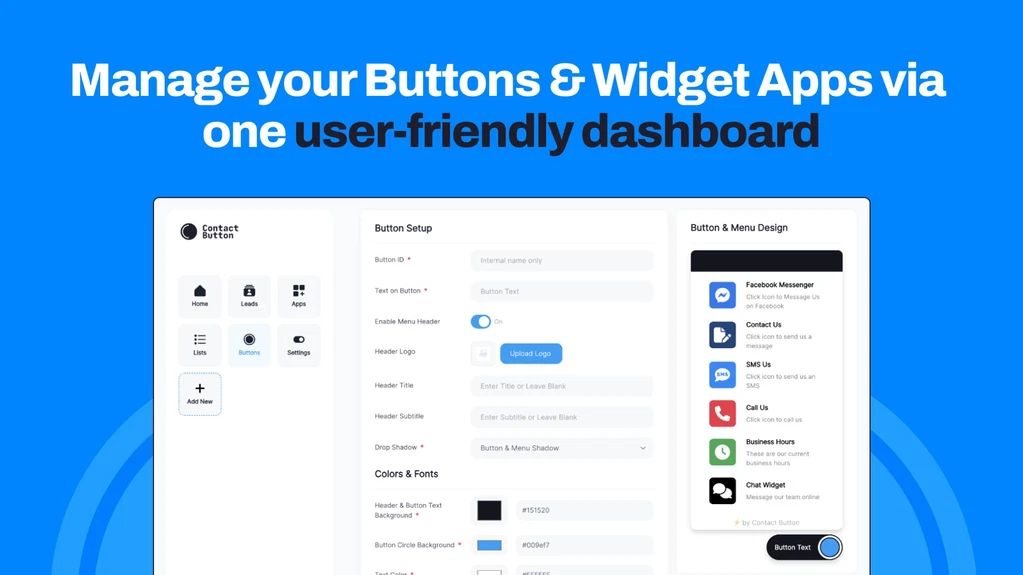
Credit: appsumo.com
Purpose Of The Lifetime Deal
The Contact Button Lifetime Deal is designed to offer long-term value. With a one-time payment, users get continuous access to all features without recurring costs. This deal simplifies user engagement and enhances functionality.
| Plan | Price | Features |
|---|---|---|
| Plan 1 | $19 (originally $100) | 1 domain license, unlimited buttons, monthly leads, custom Google fonts, hide branding |
| Plan 2 | $38 (originally $200) | 3 domain licenses, all features in Plan 1 |
| Plan 3 | $57 (originally $300) | 10 domain licenses, all features in Plan 1 |
With the Contact Button, every webpage becomes a lead generator. The integrated contact forms and booking tools make user interaction easy and intuitive. Try it with the 60-day money-back guarantee to ensure it meets your needs.
Key Features Of Contact Button
Contact Button is a versatile tool designed to enhance user engagement and capture new leads. It integrates seamlessly with your website, providing a smartphone-like experience. Explore the key features that make Contact Button a must-have for your site.
Easy Integration
Contact Button offers seamless integration with popular tools like Calendly, Mailchimp, tawk.to, WhatsApp, and WordPress. You can add widgets with just a simple line of code. No need for a developer or web design agency. This makes setup quick and hassle-free, allowing you to focus on engaging your users.
Customizable Contact Options
The Contact Button widget menu includes 15 powerful widget apps. These include contact forms, email subscriptions, and business hours. You can personalize the layout and colors to match your site’s design. This customization ensures the widget fits seamlessly into your website’s aesthetic.
User-friendly Interface
Contact Button provides a familiar, smartphone-like interface. This simplifies user engagement by centralizing key information. Visitors can easily connect, interact, and find what they need. This intuitive navigation enhances the overall user experience, making your site more engaging.
Real-time Notifications
With the Contact Button, you receive real-time updates. This ensures you are instantly notified of new leads and interactions. You can respond quickly, improving your chances of converting visitors into customers. Real-time updates keep you in the loop and ready to engage with your audience.
Analytics And Reporting
Contact Button includes robust analytics and reporting features. You can track user interactions and measure the effectiveness of your widgets. These insights help you understand how users engage with your site. You can then optimize your strategy to improve engagement and capture more leads.
Pricing And Affordability
The Contact Button widget is designed to increase user engagement and capture new leads with ease. Let’s dive into its pricing structure and how it compares to other solutions.
Understanding The Lifetime Deal
The Contact Button offers a lifetime deal with three distinct plans:
- Plan 1: One-time payment of $19 (originally $100). This plan includes a license for 1 domain, unlimited buttons, monthly leads, button clicks, custom Google fonts, embedding lists, menus, catalogs on web pages, and the ability to show/hide widget apps based on the time of day. Additionally, it allows hiding the Contact Button branding.
- Plan 2: One-time payment of $38 (originally $200). This plan covers all features in Plan 1 but extends the license to 3 domains.
- Plan 3: One-time payment of $57 (originally $300). This plan includes all features in Plan 1 and provides licenses for 10 domains.
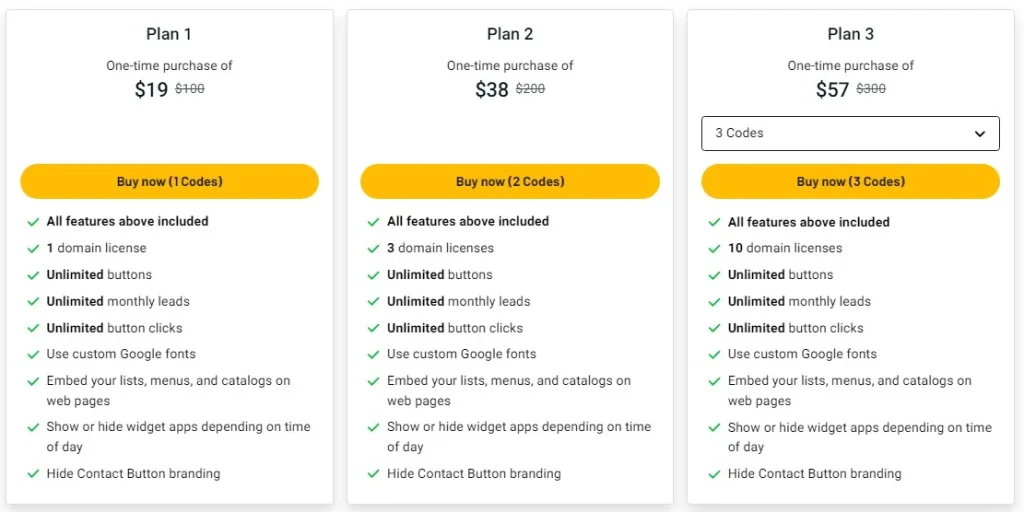
Credit: appsumo.com
Cost Comparison With Competitors
The Contact Button’s pricing is highly competitive. Here’s a cost comparison with similar solutions:
| Product | Price | Licenses | Main Features |
|---|---|---|---|
| Contact Button | $19 – $57 (one-time) | 1 – 10 domains | 15 widget apps, customizable, real-time updates |
| Competitor A | $10/month | 1 domain | Basic widgets, limited customization |
| Competitor B | $25/month | 5 domains | Standard widgets, no real-time updates |
The Contact Button provides significant cost savings, especially with its one-time payment model.
Long-term Savings
Investing in the Contact Button lifetime deal offers substantial long-term savings. Let’s break it down:
- One-time payment: No recurring monthly fees.
- Multiple domains: Plans cover up to 10 domains, reducing costs for businesses managing several websites.
- Unlimited features: Unlimited buttons, leads, and clicks ensure you never outgrow the tool.
With a one-time investment, businesses can save hundreds of dollars annually compared to monthly subscription models. The 60-day money-back guarantee also provides a risk-free trial, ensuring the product meets your needs.
The Contact Button is an affordable, feature-rich solution for enhancing website engagement and lead capture.
Pros And Cons Of Contact Button
The Contact Button offers a range of features designed to boost website engagement and capture leads. Below, we review its main advantages and drawbacks based on user feedback and product features.
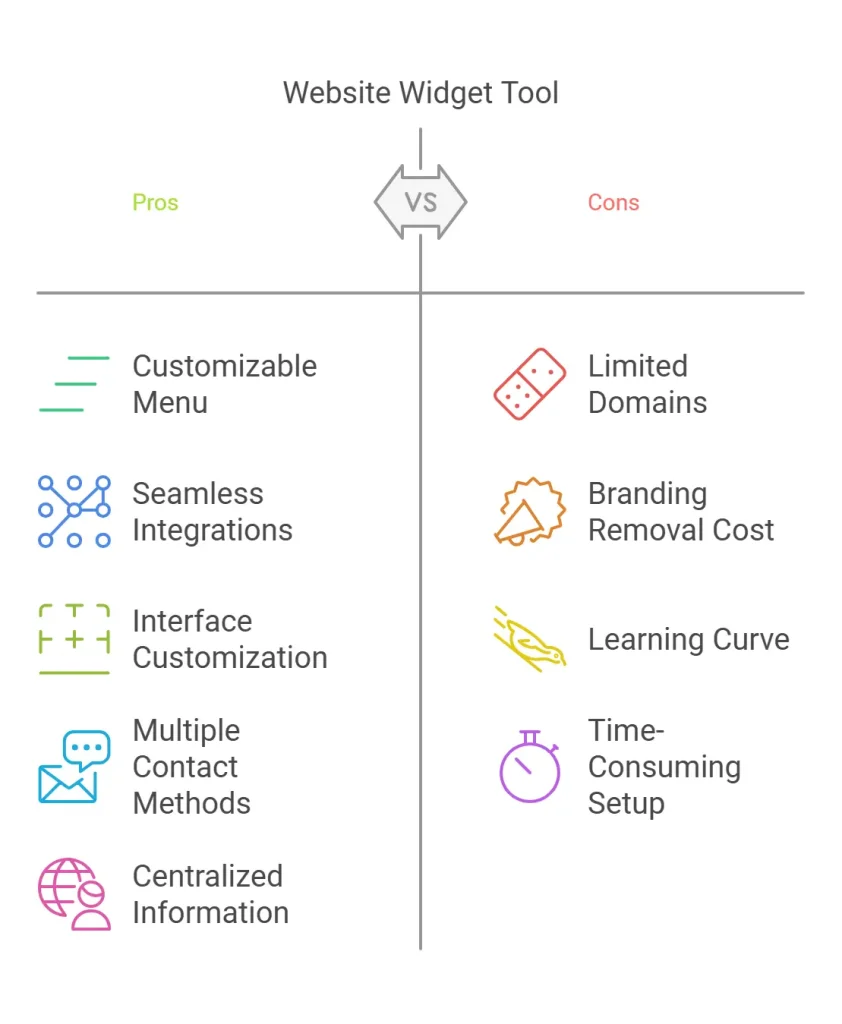
Advantages
- Customizable Widget Menu: Includes 15 widget apps like contact forms and email subscriptions.
- Seamless Integration: Works with tools like Calendly, Mailchimp, and tawk.to WhatsApp, and WordPress.
- Easy Setup: No need for developers or web designers; just add a simple line of code.
- Customizable Interface: Personalize layout and colors to match your site’s design.
- Real-Time Updates: Enhance functionality instantly with real-time updates.
- Improved User Engagement: Simplifies engagement with a smartphone-like interface.
- Lead Generation: Converts every page into a lead generator with integrated contact forms and booking tools.
Drawbacks
- Limited Free Plan: The free version has limited features compared to paid plans.
- Potential Overload: Too many widgets can overwhelm users if not configured properly.
- Customization Limits: Some users may find customization options limited.
User Feedback And Reviews
| User | Feedback |
|---|---|
| John D. | “Easy to set up and customize. Great for capturing leads.” |
| Sarah K. | “Integration was smooth, but too many widgets can be confusing.” |
| Michael L. | “Good value for the price. Limited customization options, though.” |
Ideal Users And Scenarios
The Contact Button widget provides a versatile, all-in-one solution for various users. Its customizable features and ease of integration make it suitable for different scenarios. Below, we explore the ideal users and their specific scenarios.
Small Businesses And Startups
For small businesses and startups, Contact Button is an effective tool for increasing engagement. Its customizable widget menu allows businesses to centralize key information, making it easier for customers to connect. This is crucial for businesses operating with limited marketing budgets.
- Integrate with tools like Calendly for easy appointment scheduling.
- Use email subscriptions to build a customer base.
- Show business hours directly on your site.
Freelancers And Consultants
Freelancers and consultants benefit greatly from the Contact Button widget. It simplifies the process of capturing leads and scheduling meetings. The seamless integration with tools like tawk. to and WhatsApp ensures easy communication with clients.
- Integrate contact forms to capture new leads.
- Use customizable interfaces to match personal branding.
- Set up real-time updates to keep clients informed.
E-commerce Platforms
E-commerce platforms can leverage Contact Button to enhance user experience. By providing multiple contact methods, customers can easily reach out for support or inquiries. This can lead to increased sales and better customer satisfaction.
- Embed product catalogs directly on web pages.
- Use custom Google fonts for a professional look.
- Show or hide widget apps based on the time of day.
Customer Support Teams
Customer support teams can greatly enhance their efficiency with the Contact Button widget. It allows for easy and quick access to support resources, leading to faster resolution times and improved customer satisfaction.
- Integrate with tools like tawk.to for live chat support.
- Provide easy access to FAQs and support documents.
- Use real-time updates to keep customers informed.

Credit: www.youtube.com
Frequently Asked Questions
What Is The Contact Button Lifetime Deal?
The Contact Button Lifetime Deal offers a one-time purchase for a lifetime subscription. This deal includes all future updates and features.
How Does Contact Button Work?
Contact Button provides a simple way to add contact forms to your website. It integrates seamlessly with various platforms.
Is the Contact Button User-friendly?
Yes, the Contact Button is designed to be user-friendly. It requires no coding skills and offers an intuitive interface.
Can I Customize The Contact Button?
The Contact Button allows extensive customization. You can change colors, text, and placement to match your website’s design.
Conclusion
Contact Button offers a simple solution for increasing website engagement. Its customizable widget menu and seamless integration make it user-friendly. With easy setup and real-time updates, it suits any website. The one-time payment plans are affordable, and the 60-day money-back guarantee adds peace of mind. Improve your site’s functionality and capture more leads with Contact Button. Learn more and get your deal here.